Intel Data Platform Guide
Who this is for: analysts, researchers, and team members who want to use the data we collect — where it lives, how it gets there, when it refreshes, and how to query it. No code access required.
This file is the source of truth. The Markdown file
docs/data/data_guide.mdis the source; the online page atdatadocs.hml.stis generated from it automatically by CI on every push tomain. Edit here, open a PR — CI renders and publishes. See How this page is built.
Overview
Everything we collect — social media, TV, radio, online news — plus everything we derive from it — narratives, subjects, and the momentum report — lives in two stores:
| Store | What it holds | How you query it |
|---|---|---|
Google BigQuery — intel-487218.datawarehouse |
Raw collected content (posts, articles, transcripts) and analytics time-series (daily mention/volume tables) | SQL, directly (this is the analyst-facing store) |
| PostgreSQL (Render-managed app DB) | Source-of-truth catalogs and definitions (POIs, narratives, subjects), analysis results surfaced in the app (the momentum report), plus auth & ops. HML-950 stopped writing events, briefs and alignment. Those tables remain. | Through the app UI / API; direct SQL is for engineers |
Rule of thumb: if you want to analyze content or trends, you want BigQuery. If you want the curated definitions and finished results the product shows, that's PostgreSQL — reachable via the app at hml.st or the API.
The data moves through four layers: Collection → Storage → Processing → Presentation. The full diagram is in docs/diagrams/data-flow.txt.
Architecture diagrams
Two diagrams live in docs/diagrams/: end-to-end data flow (Collection → Storage → Processing → Presentation, plus detailed Publishers/messaging-funnel and Events sub-pipelines) and deployment topology (Render vs GCP, schedulers, workflows, jobs, secrets, external APIs). Click either image to open the full-size SVG.
No longer collected (2026-10-30): the
pixel_*tables (Pixel), themashlat_*mirror (Mashlat ETL) and thecc_*tables (the/ccweb UI) keep their data, but nothing writes to them now. The Pixel,/ccand Mashlat ETL code, jobs and schedulers are deleted (PR #1871). The D-Day readers still query themashlat_*mirror tables, so its data goes stale until someone loads it again.No longer produced (HML-950): weekly and daily briefs, private audience reports, the events pipeline, the messaging funnel, publishers, GEO, and the D-Day trusted-source bypass. The tables stay. Nothing in this change deletes a row of content. The list is
DELETED_FEATURES.md. A later section of this guide that names one of those features describes the tree from before the change. The D-Day product and the momentum report stay.Refreshed 2026-08-13 to match the ScrapeCreators migration, the official X API /
col:5xfrequent-collection paths, and the Pixel pipeline. If this guide and the diagrams ever drift again, the tables below in this guide are the current source of truth — diagrams are refreshed on request, not on every change.
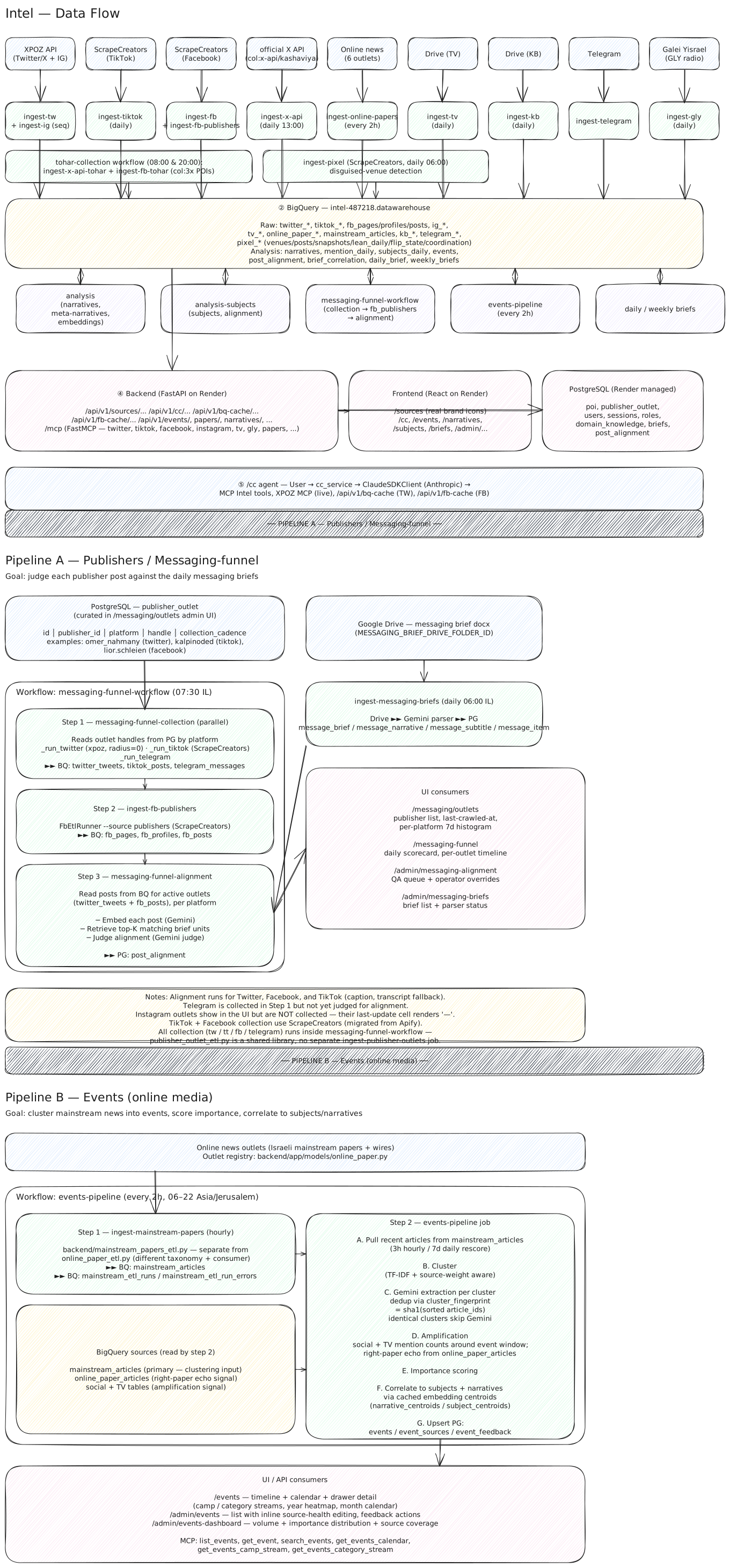
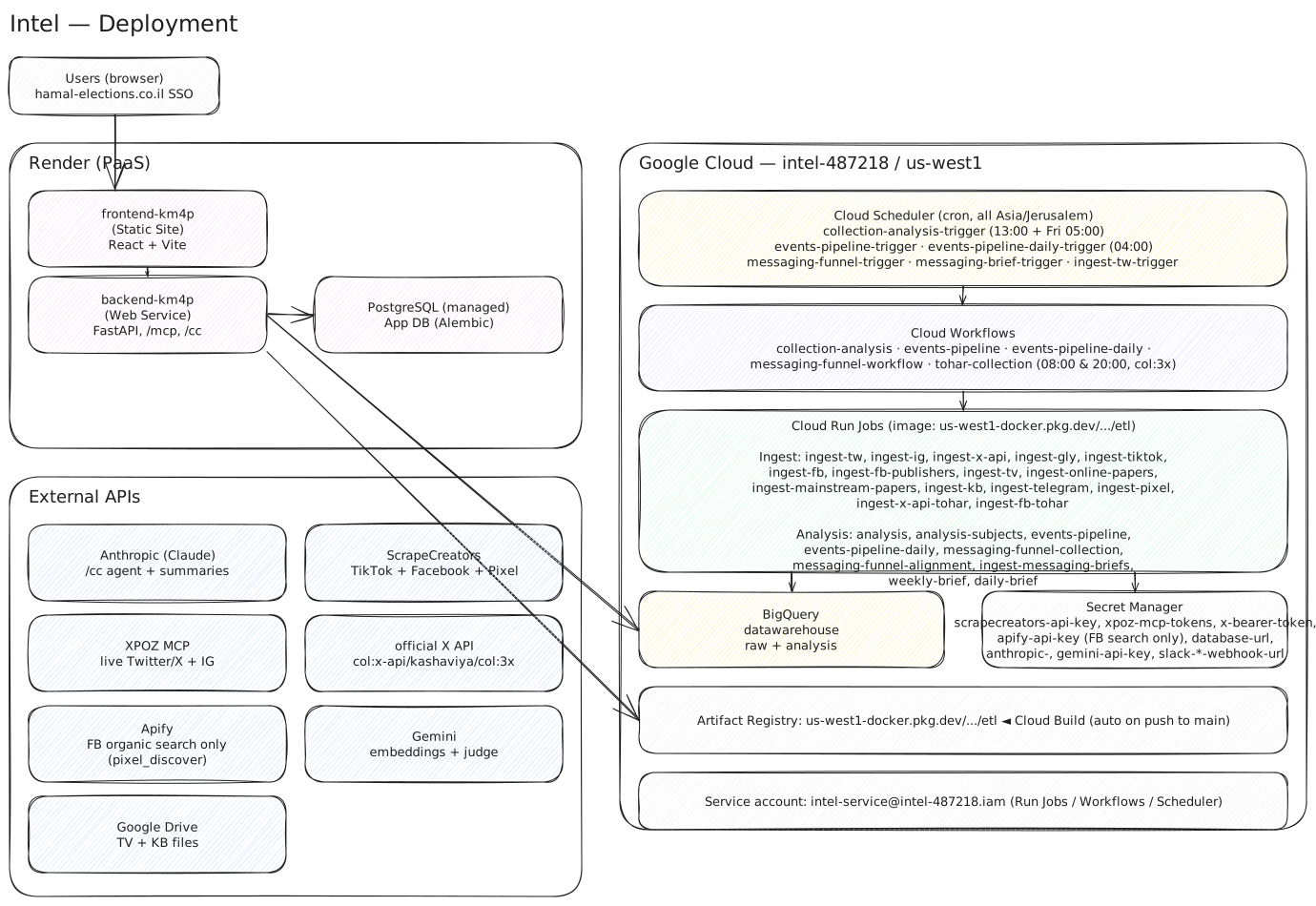
Ingestion (Collection)
Scheduled Cloud Run Jobs (region us-west1) pull from each source and write raw rows to BigQuery. POI handles to track come from Postgres (pois). No ingest job writes to Postgres — all raw data lands in BigQuery.
| Source | Collected via | Entrypoint | Cadence | Lands in (BQ) |
|---|---|---|---|---|
| Twitter / X | XPOZ API | backend/xpoz_etl.py (ingest-tw; no standalone scheduler — runs inside collection-analysis) |
daily 12:00 (+ Fri 05:00, within collection-analysis) |
twitter_* |
| Twitter / X (official API) | official X API | backend/x_api_etl.py (ingest-x-api, col:x-api-tagged POIs, incremental via since_id) |
daily 12:00 (+ Fri 05:00, within collection-analysis) |
twitter_tweets |
Twitter / X (col:5x, XPOZ) |
XPOZ API | backend/xpoz_etl.py (ingest-tw-5x, --tags col:5x --exclude-tags col:x-api; skips while ingest-tw runs) |
00:00, 08:00, 16:00, 20:00 (via collection workflow) |
twitter_tweets |
Twitter / X (col:5x) |
official X API | backend/x_api_etl.py (ingest-x-api-5x, --all-tags col:5x col:x-api) |
00:00, 08:00, 16:00, 20:00 (via collection workflow) |
twitter_tweets |
| Twitter / X (Bright Data) | Bright Data | ingest-brightdata-5min (every POI's posts; skips camp:red / col:x-api) |
every 1 minute (skip-if-running) | twitter_tweets (ingestion_source=bright_data) |
| Bright Data posts + XPOZ entities | Posts: ingest-brightdata-5min (every POI); hourly ingest-ig-sc (ScrapeCreators) while Bright Data's Instagram is down (HML-913). Daily ingest-ig at 12:00 (entities + transcription; posts skipped). |
1-min BD + daily 12:00 | ig_* (ingestion_source) |
|
| TikTok | Bright Data posts + ScrapeCreators users | Posts: ingest-brightdata-5min (every POI). Daily ingest-tiktok at 12:00 (users + transcription; posts skipped). |
1-min BD + daily 12:00 | tiktok_* (ingestion_source) |
| Bright Data posts + ScrapeCreators entities | Posts: ingest-brightdata-5min (every page, profile, and public group). Daily ingest-fb refreshes entities. Private groups stay on ScrapeCreators. |
every 1 minute + daily entities | fb_pages, fb_profiles, fb_posts (ingestion_source on posts) |
|
| Telegram | web scraper | backend/telegram_etl.py |
daily | telegram_* |
Telegram (col:5x) |
web scraper | backend/telegram_etl.py (ingest-telegram-5x, --tags col:5x --refresh-days 0) |
00:00, 08:00, 16:00, 20:00 (via collection workflow) |
telegram_* |
| TV (Channel 14) | Google Drive | backend/tv_etl.py |
every 15 min, 24/7 | tv_* |
| Radio (Galei Yisrael) | site scraper | backend/gly_etl.py |
daily | gly_* |
| Online papers | site scrapers | backend/online_paper_etl.py |
every 2h / daily | online_paper_articles |
| Mainstream papers | site scrapers | backend/mainstream_papers_etl.py (ingest-mainstream-papers; feeds the events pipeline, separate taxonomy from Online papers above) |
hourly (within events-pipeline workflow) |
mainstream_articles |
| Podcasts | RSS + Gemini | backend/podcast_etl.py (ingest-podcasts; downloads each new episode's MP3 and transcribes to Hebrew via Gemini) |
daily 12:00 (+ Fri 05:00, within collection-analysis) |
podcast_* |
| Knowledge Base | Google Drive | backend/kb_etl.py |
daily | kb_* |
Each pipeline follows the same pattern: raw content tables, plus <platform>_etl_runs / _etl_run_errors (run audit) and <platform>_*_fetches (delta-window tracking). Raw tables upsert through a transient <table>_staging twin.
Live path, flag on: X's Activity API (XAA) pushes new posts as they land instead of waiting for
ingest-x-api-5x. Thex-activity-streamreader holds the single socket and publishes each NDJSON event to Pub/Sub (x-activity-events); it does not MERGE and does not transcribe.x-activity-workerinstances MERGE into the sharedtwitter_tweetstable (ingestion_source=x_activity) and then publish the mapped tweet to Pub/Sub topictwitter-live-tweetsfor other teams. Videos reuse the existingtwitter-transcribetopic and service. Gated by Hamal ConfigCatxActivityStreamEnabled(default on; missing SDK / outage / missing flag => on) — dashboard Off is the kill-switch; do not setX_ACTIVITY_STREAM_ENABLED=true. Allowlist is POIs taggedcamp:redorcol:x-api(union) with atwitter_id. Hourly jobx-activity-subscription-synckeeps XAApost.createsubscriptions matched to that allowlist (ADR 0011). Paid polling viapois.x_api_since_idstill runs and stayscol:x-apionly. Connection health is tracked inx_activity_stream_connections. See ADR 0012 and ADR 0008.
Processing (Analysis)
Analysis jobs read from BigQuery, load their catalogs (narratives, subjects, POIs, domain knowledge) from Postgres at startup, and write outputs back to both stores.
| Pipeline | Entrypoint | Reads | Writes |
|---|---|---|---|
| Narratives | backend/analysis_narratives.py |
BQ raw posts | PG narratives (catalog) · BQ mention_daily, narrative_sources, emerging_terms, dashboard_summary |
| Subjects | backend/analysis_subjects.py |
BQ raw posts | PG subjects · BQ subjects_sources, subjects_daily |
| D-Day Signs (סימנים מעידים) | dday-candidates → dday-judge → dday-events, + non-blocking dday-locations |
BQ raw tables + PG dday_scenarios/dday_scenario_versions (Sign definitions) |
BQ dday_scenario_candidates, dday_scenario_detections, dday_detection_locations · PG dday_events, dday_event_detections, dday_event_places |
Most analysis uses Gemini for classification, extraction, embeddings, and Hebrew synthesis.
The D-Day Signs pipeline is a three-stage chain — candidate nomination (keyword match), judging (Gemini + grounding check), aggregation into scored events for the /dday/triage queue — documented in full in docs/dday_signs.md (content selection, the judge's grounding rule, event merge/corroboration, service-time bands, the approval chain). This section and the tables below cover only where its data lives.
When the flows run
All schedules are Asia/Jerusalem; schedulers live in us-west1 (Cloud Scheduler → Workflows).
| Time (IL) | What runs |
|---|---|
| daily 11:00 | Bright Data posts for camp:red and camp:purple on Facebook, Instagram and TikTok. TV. Mainstream papers, when that scheduler already exists. |
| daily 12:00 | collection-analysis: XPOZ (ingest-tw), Telegram, podcasts, online papers, radio and KB for those camps where a camp filter applies. Then analysis and the momentum report. |
| daily 16:00 | momentum-report-monthly |
| hourly | x-activity-subscription-sync deletes X Activity subscriptions. The stream itself is stopped. |
| paused | collection at 00:00, 08:00, 16:00 and 20:00. ingest-ig-sc at :25. The D-Day triggers (HML-951). |
To check the last successful run of any pipeline, query its <platform>_etl_runs table in BigQuery, or use /admin/jobs in the app.
Getting notified when collection finishes (Pub/Sub)
Don't want to poll BigQuery or /admin/jobs? collection-analysis publishes a Pub/Sub event — with per-source success/failure counts — right after its collection phase finishes, before analysis starts. The collection workflow can publish the same event. Its triggers are paused, so it does not.
- Topic:
projects/intel-487218/topics/ingestion-completed - Fires: once per workflow run —
collection-analysisdaily at 12:00. Thecollectiontriggers at 00:00, 08:00, 16:00 and 20:00 are paused, so they do not publish. All times are Asia/Jerusalem (see When the flows run above) - Attributes (filter subscriptions on these without decoding the message body):
workflow(collection-analysis|collection),phase(alwayscollection),status(success|partial_failure)
Message body (JSON, base64-encoded in the Pub/Sub data field — any client library decodes this automatically):
{
  "workflow": "collection-analysis",
  "status": "partial_failure",
  "timestamp": "2026-08-12T09:03:41Z",
  "summary": {
    "total_sources": 10,
    "sources_succeeded": 9,
    "sources_failed": 1,
    "items_succeeded": 4213,
    "items_failed": 7
  },
  "sources": {
    "tw": { "status": "success", "succeeded": 812, "failed": 0 },
    "kb": { "status": "failed", "succeeded": 0, "failed": 7 }
  },
  "failed_sources": ["kb"]
}
sources.<name>.succeeded/.failed are item-level counts (posts/documents processed vs. failed within that source's own run), not just whether the job process exited 0.
To subscribe, you need roles/pubsub.subscriber on the topic — ask a project developer to grant it to you or your service account (see For admins for the equivalent BigQuery grant pattern; same idea, roles/pubsub.subscriber instead). Once granted:
gcloud pubsub subscriptions create my-subscription \
  --project=intel-487218 \
  --topic=ingestion-completed \
  --topic-project=intel-487218

gcloud pubsub subscriptions pull my-subscription --project=intel-487218 --auto-ack --limit=5
If you're on a different GCP project (same org or not), you don't need access to this repo or project console — ask a project developer to grant your service account subscriber rights on the topic (or set up a push subscription to your endpoint on your behalf); you only need the topic name above and your own gcloud/client-library access to your own project.
For server-side filtering (e.g. only failures, or only one workflow), the full cross-project setup (both "you subscribe" and "we push to your endpoint" patterns), and delivery/idempotency notes, see Subscribing to ingestion-completed — everything above is enough to get started even without access to that file.
Where things live — BigQuery vs PostgreSQL
The same concept often has a definition in Postgres and time-series data in BigQuery. This map tells you which side to query:
| Entity | PostgreSQL (source of truth) | BigQuery |
|---|---|---|
| Narratives | narratives |
mention_daily, narrative_sources |
| Meta-narratives | meta_narratives |
denormalized onto narratives.meta_narrative |
| Group narratives | narrative_groups + narratives |
same narratives / mention_daily / narrative_sources |
| Keyword narratives | keyword_monitors, keyword_narratives |
(reads raw tables; no dedicated BQ output) |
| Subjects | subjects |
subjects_sources, subjects_daily |
| Events | events, event_sources, event_feedback |
(reads online_paper_articles + counts; no BQ output) |
| Weekly / daily briefs | weekly_briefs, daily_brief |
— |
| POIs / domain knowledge | pois, domain_knowledge |
poi_accounts (handle → camp / stance / kind) |
| Raw social/news/TV/radio/podcast content | — | twitter_*, tiktok_*, fb_*, ig_*, telegram_*, tv_*, gly_*, podcast_*, online_paper_articles, kb_* |
| Mashlat analytics (incident reports) | — | mashlat_signals, mashlat_events, mashlat_cases, mashlat_tasks, mashlat_regions, mashlat_region_cities, mashlat_teams, mashlat_event_categories, mashlat_signals_files, mashlat_events_files, mashlat_signals_events |
| Pixel (disguised-venue investigation) | — | pixel_venues, pixel_posts, pixel_venue_snapshots, pixel_lean_daily, pixel_flip_state, pixel_coordination, pixel_ig_* (IG intake) |
| D-Day Signs (סימנים מעידים) | dday_scenarios, dday_scenario_versions, dday_scenario_stat, dday_events, dday_event_detections, dday_event_places, dday_event_lineage, dday_event_assessments, dday_event_notes |
dday_scenario_candidates, dday_scenario_detections, dday_detection_locations |
| K26 ballot boxes (קלפיות) | ballot_datasets, ballot_boxes, ballot_place_results, ballot_town_results, ballot_place_matches, ballot_match_overrides, view ballot_boxes_merged |
— |
K26 ballot boxes (HML-745). The election authority's box file (about 12,000 boxes, 4,372 polling places) is reference data, so it lives in Postgres, versioned: one ballot_datasets row per upload, exactly one active. ballot_boxes holds one row per box (station_number is TEXT: 12.1 is not 12.10). harmonized_id is the file author's own number for a polling place, fixed across elections (box 77 in Modiin in K25 is not always in the same place or neighbourhood as in K21), so it names a polling place, not a box. Whether it is stable on a republish is not yet confirmed. K21-K25 history is stored once per polling place in ballot_place_results (long: one row per place and election), never per box, so it cannot be summed over box rows. ballot_place_matches is the merge with Mashlat: each place gets a region and an "אשכול קלפיות" (tier 1-5, 0 for an override in ballot_match_overrides: keyed on harmonized_id, cluster_id NULL means "confirmed no match", it survives every upload and is applied first by every merge, and no later tier may take a cluster an override took except by the same address), with a snapshot of the cluster fields so readers never need BigQuery. A place's region is its town's row in Mashlat's mashlat_region_cities, which always wins; the seven towns that table does not list (as of 2026-10-16) take a fixed region from FALLBACK_REGION_BY_TOWN in ballot_merge.py (by region name, resolved to Mashlat's id at merge time), and a town in neither has no region. Read through the view ballot_boxes_merged (active dataset only). Mashlat's mashlat_clusters and mashlat_region_cities stay in BigQuery and are read at merge time. Load with backend/scripts/load_ballot_dataset.py (dry-run by default), or sync the authority's latest file from Gilad's feed with backend/scripts/sync_ballot_feed.py (dry-run by default; uploaded_by sync:vote.ravid.org, HML-763); the Cloud Run job ballot-feed-sync does the same with --apply once a day at 07:00 Asia/Jerusalem. A block of zeros in an old election is parsed as no result, not as a result of zero (since 2026-10-18 the feed leaves a cell with no value empty and 0 is a real zero; the guard defends against the earlier shape). today_* is a report when today_voters and today_snapshot_at are filled (a counted 0 is a report; an empty today_voters or a 0 with no snapshot time is NULL). K26 (HML-764): the place's k26_* columns are a ballot_place_results row with election = 26 once a vote count is above 0; ballot_boxes also holds boxes_at_place, place_eligible, the election-day today_voters / today_snapshot_at / today_turnout_pct and the box's own result k26_box_* (all NULL until reported; migration 20261016_0001). The view ballot_boxes_merged also carries k26_box_voters and k26_box_valid (migration 20261016_0002). Live turnout is SUM(today_voters) / SUM(eligible) over the boxes that reported (never a mean of percentages). The dissect reads (/api/v1/dday/ballots/aggregate) take turnout as sum(voters)/sum(eligible) over places, bloc and winner shares (0-100) weighted by valid votes, and population over distinct statistical areas.
BigQuery table catalog
Grouped by source. Key columns are a starting point — the full schema is visible in the BigQuery console.
🐦 Twitter / X
| Table | Contents | Key columns |
|---|---|---|
twitter_users |
X profiles | username, name, description, location, followers_count, verified, gist (AI role summary) |
twitter_user_snapshots |
daily profile numbers per X account (from the user-refresh ETL; history starts at first run after HML-669) | user_id, snapshot_date, username, name, description, followers_count, following_count, tweet_count |
twitter_tweets |
Tweets (partitioned by created_at day) |
id, text, author_username, created_at, created_at_date, like_count, retweet_count, reply_count, quote_count, hashtags, reply_settings |
twitter_followers |
follower→followee edges | follower_id, followee_id |
twitter_user_geocodes |
geocoded user locations | normalized_location, latitude, longitude |
reply_settingsis only populated for the official-X-API rows (col:x-api-tagged POIs — see the Ingestion table above). It'sNULLfor the bulk oftwitter_tweets, which comes via XPOZ: verified live against XPOZ's API that it silently drops unsupported field names from a fields request rather than erroring, andreplySettings/conversationControlare not among the fields it returns — this isn't a config gap, XPOZ just doesn't expose who-can-reply data.
🎵 TikTok
| Table | Contents | Key columns |
|---|---|---|
tiktok_users |
accounts | username, nickname, follower_count, like_count, post_count, is_verified |
tiktok_posts |
videos | id, username, description, created_at_date, ingestion_source, video_url (watch page), download_url (dead proxy URL on old rows, NULL on new), play_count, like_count, comment_count, share_count, transcript |
Column video_url is the watch page (tiktok.com/@handle/video/<id>), not an mp4. Column download_url was the Cloud Run proxy URL; the proxy was deleted on 2026-10-30, so it is NULL on new rows and dead on old ones. The raw CDN is still raw_payload.video.play_addr.url_list[0]. See How to download TikTok videos. Cover (video_thumbnail) is cookie-free.
Videos are transcribed. Every collection pass pulls the audio track off each new video (yt-dlp → ffmpeg → Gemini, same path as podcasts and FB/X video) and writes three columns: transcript (the text), transcript_language (he-IL), and transcribed_at. This is spoken audio, which is a different thing from description — the caption the author typed. For "what did this person actually say", search transcript; for "how did they frame the post", read description.
Transcription is gated on engagement — share_count×3 + comment_count×2 + like_count, the same weighting the warehouse uses to rank TikTok posts for subjects and narratives, with a default threshold of 250. Low-reach videos are deliberately left untranscribed. This matches how Facebook, X and Instagram already work.
transcript IS NULL therefore means one of three things, and they are worth telling apart: the video was below the engagement gate, or we tried and got nothing back (no speech in the clip), or it hasn't been attempted yet. transcribed_at is the discriminator — it is stamped on every finished attempt, successful or not, so transcribed_at IS NOT NULL AND transcript IS NULL is precisely "we tried, there was nothing to transcribe".
Historical coverage — collected before the gate existed, when everything was transcribed — was ~79% of videos with any text but only ~61% with 100+ characters, median ~430 chars. The gap skews by account type: politicians' own accounts ran 90–96%, short-form news desks much lower (mako.israel 61%, n12news 71%), because so much of their output is captioned b-roll over music with no speech in it. Expect lower volume and a similar hit rate going forward — the gate cuts spend, it does not improve the ratio, because engagement barely predicts whether a clip contains speech.
Use video_duration_ms, not video_duration. The old video_duration column mixed units by collector — milliseconds from ScrapeCreators, seconds from XPOZ and Apify (measured on the same videos: 100.75 where ScrapeCreators said 100750) — so any query over it was wrong for part of the table. video_duration_ms is milliseconds for every row, backfilled from the collector recorded on each row rather than guessed from magnitude. Divide by 1000 for seconds.
⚠️
video_durationis left in place, unit-mixed and no longer written, purely as a rollback path. Rows collected from 2026-08-20 have it NULL. Do not query it.
The same convention holds for fb_posts and twitter_tweets: transcribed_at records the attempt, transcript holds text or NULL. Both carried [empty]/[failed] marker strings for a few days from 2026-08-13; if you are querying historical rows and see those values, treat them as NULL.
| Table | Contents | Key columns |
|---|---|---|
fb_pages |
pages | username, name, category, followers_count, page_url |
fb_profiles |
personal profiles | username, name, bio, friends_count, location |
fb_posts |
posts (pages + profiles + groups) | id, source_type, username, text, permalink, created_at_date, ingestion_source, reactions_total, comments_count, shares_count |
| Table | Contents | Key columns |
|---|---|---|
ig_users |
accounts | username, full_name, biography, follower_count, media_count |
ig_posts |
posts / reels | id ({media}_{user}), username, post_type, caption, like_count, comment_count, ingestion_source, transcript, created_at_date |
✈️ Telegram
| Table | Contents | Key columns |
|---|---|---|
telegram_channels |
channels | username, title, description, member_count |
telegram_messages |
messages | id, channel_username, text, created_at_date, views, forwards, forwarded_from_channel, link_domain |
📺 TV (Channel 14) & 📻 Radio (Galei Yisrael)
| Table | Contents | Key columns |
|---|---|---|
tv_documents |
parsed broadcast transcripts | broadcast_date, doc_type, content_markdown, word_count, speakers |
tv_segments |
per-speaker transcript segments | file_id, speaker, text, timestamp_str |
gly_segments |
radio program segment headlines | program_name, headline, subtitle, broadcast_date, mp3_url |
gly_programs |
program registry | program_id, title, description_html |
🎙️ Podcasts
| Table | Contents | Key columns |
|---|---|---|
podcast_episodes |
episode registry (per show, from RSS) | episode_id, show_slug, title, audio_url, published_date, duration_seconds, transcript_status |
podcast_documents |
one parsed-episode document (mirrors tv_documents) |
episode_id, show_slug, published_date, content_markdown, word_count, speakers |
podcast_segments |
per-speaker transcript segments | podcast_segment_id, episode_id, show_slug, segment_index, speaker, text |
📰 Online papers & 📚 Knowledge Base
| Table | Contents | Key columns |
|---|---|---|
online_paper_articles |
news articles | outlet_slug, title, author, url, published_at, summary, content_text, ai_summary |
mainstream_articles |
events-pipeline's news source (separate taxonomy from online_paper_articles) |
outlet_slug, title, url, published_at, content_text, gdelt_gkg_id (GDELT's GKGRECORDID, when sourced via GDELT) |
kb_documents |
internal Drive documents | file_id, content_markdown, word_count, page_count |
🚨 Mashlat analytics (incident reports)
Mirrors Mashlat's read-only analytics.* Postgres views (a separate GCP project, mashlat-c2) for D-Day incident response data — signals from the field, triaged events, cases, and tasks, plus dimension lookups. signals/events/cases/tasks sync incrementally (every 5 minutes, via a last_modified watermark); the rest are small dimension/junction tables, fully re-extracted every run. reporter_name/reporter_phone (PII on mashlat_signals) are intentionally not mirrored.
| Table | Contents | Key columns |
|---|---|---|
mashlat_signals |
raw field reports (app, phone, WhatsApp, patrol, simulation) | id, external_id, received_at, source, status, severity_raw, body, region_id, event_id (deprecated — see below), location (GEOGRAPHY), last_modified |
mashlat_events |
triaged incidents | id, title, status, severity, category_id, region_id, case_id, due_at, resolved_at, location (GEOGRAPHY), last_modified |
mashlat_cases |
case files grouping related events | id, title, summary, status, severity, region_id, last_modified |
mashlat_tasks |
work items on an event | id, title, status, priority, event_id, assigned_team_id, due_at, completed_at, last_modified |
mashlat_regions |
geographic/org regions (dimension) | id, name, code |
mashlat_region_cities |
Mashlat's city → region table (full extract, ~1.2k rows; HML-541). Read at runtime to build the locality → region map; created by ensure_schema() on the first ingest-mashlat run |
id, city, region_id (the region's UUID), region_name, deleted_from_source_at |
mashlat_teams |
response teams (dimension) | id, name, type, region_id, phone |
mashlat_event_categories |
incident category lookup (dimension) | id, name, default_severity, sla_minutes |
mashlat_signals_files |
signal↔file attachment links (junction) | id, signal_id, file_id, sort |
mashlat_events_files |
event↔file attachment links (junction) | id, event_id, file_id, sort |
mashlat_signals_events |
signal↔event links, many-to-many (junction) | id, signal_id, event_id, sort |
locationcolumns areGEOGRAPHY(point), decoded server-side from the source's PostGIS geometry.As of 2026-08-11, a signal can link to more than one event (
signals.eventwas retired for a many-to-many relation).mashlat_signals.event_idstill exists but now only reflects the earliest-linked event, kept for backward compat — joinmashlat_signals_eventsfor the full picture.
📈 Analysis time-series
| Table | Contents | Key columns |
|---|---|---|
narratives |
frozen 2026-03 — now in PG | narrative_id, name_he, meta_narrative, escalation_stage, political_camp |
mention_daily |
daily narrative metrics | narrative_id, source_platform, mention_date, volume, engagement, poi_volume |
narrative_sources |
per-post narrative mentions | narrative_id, source_item_id, source_platform, mention_date, engagement, raw_engagement, is_poi |
subjects_daily |
daily subject metrics | subject_id, mention_date, source_platform, camp, volume, engagement, top_actors, top_posts |
subjects_sources |
per-post subject mentions | subject_id, source_platform, author_id, camp, mention_date, engagement |
emerging_terms |
trending terms | term, growth_pct, first_seen_date, run_date |
dashboard_summary |
per-run KPIs | run_date, total_posts_7d, active_narratives_count |
engagementvsraw_engagement(HML-155). Every per-item post query wraps its weighted-interaction formula inLN(1 + ...)— a log-compressed score meant only for ranking one post against another (it stops one viral post dominating a narrative's top-posts list).narrative_sources.engagementholds that ranking score;is_poiordering and top-posts selection should keep using it.narrative_sources.raw_engagementholds the true, unlogged interaction count and is whatmention_daily.engagementsums — summing the log-compressed score instead (as this table did before HML-155) makesmention_daily.engagementtrackmention_daily.volumealmost 1:1, which is what the weekly-brief chart bug looked like.tv/podcast/online_paperhave no native engagement signal, so theirraw_engagementis always0(theirengagementstays a constant ranking proxy, not a measurement).
👤 POI accounts
| Table | Contents | Key columns |
|---|---|---|
poi_accounts |
every live POI social account, mirrored every 30 minutes from PG pois by analysis-subjects-fast (HML-576) |
platform, handle (key; equals the post table's author column), poi_slug, camp, stance, kind, removed_at |
stance is derived from the POI's camp: tag (red→right, blue→left, purple/gray→neutral; no
camp tag → camp='none', stance='unknown', never NULL, so removing a tag clears the old value). A POI tagged
subcamp:red2 (red-camp amplifiers, mostly camp:gray) gets stance='right' whatever its camp. kind is media for paper / TV / radio / podcast POIs and any POI tagged kind:media or
arab:media, else account. Each run is a full extract: a handle no live POI carries any more gets removed_at
stamped rather than being deleted, so filter on removed_at IS NULL for the current set.
🕵️ Pixel (disguised-venue detection) — retired, data kept
The collection jobs (ingest-pixel, ingest-pixel-ig, ingest-ig-comments-sc) and their schedulers were deleted on 2026-10-30. These tables hold the last data collected.
Kept deliberately separate from fb_pages/fb_posts: these are investigation targets (suspected sleeper pages), not tracked POIs.
| Table | Contents | Key columns |
|---|---|---|
pixel_venues |
candidate venues + A1 provenance | handle, name, page_url, admin_country, former_names, runs_political_ads |
pixel_posts |
venue posts | post_id, venue_handle, text, reactions_total, is_political, stance_json |
pixel_venue_snapshots |
daily follower/like/post-count snapshots | handle, snapshot_date, followers_count, likes_count, post_count |
pixel_lean_daily |
daily pro-Likud lean per venue (flip-watch timeline) | handle, day, lean, political_posts |
pixel_flip_state |
latest flip verdict per venue (dedup for alerting) | handle, flipped, changepoint_day, lean_before, lean_after |
pixel_coordination |
cross-venue co-shared URL/media clusters | cluster_id, kind, venues, coordinated, span_minutes, evidence |
pixel_ig_profiles |
Instagram venue intake — profiles | username, full_name, biography, follower_count, fb_handle (linked FB venue, if known) |
pixel_ig_posts |
Instagram venue intake — posts | post_id, username, post_type, caption, like_count, comment_count, is_political, stance_json |
pixel_ig_comments |
comments on pixel_ig_posts (commenter-overlap analysis) |
comment_id, post_id, post_username, commenter_username, text, created_at_date |
pixel_ig_following |
who each suspect IG venue follows | username, following_username, following_full_name, is_verified |
pixel_ig_followers |
who follows each suspect IG venue (ranked, oldest first) | username, follower_username, rank, first_seen_at, last_seen_at |
🚨 D-Day Signs (סימנים מעידים)
The Sign detection pipeline's audit trail — see docs/dday_signs.md for what a "Sign" is and how a candidate becomes a detection. Sign definitions (dday_scenarios, dday_scenario_versions) and finished events (dday_events, dday_event_detections) are in Postgres — these BQ tables are the append-only trail behind them.
| Table | Contents | Key columns |
|---|---|---|
dday_scenario_candidates |
stage 01 output — every keyword hit nominated for judging | candidate_id, scenario_id, sign_slug, platform, item_id, occurred_on, text, matched_keywords |
dday_scenario_detections |
stage 02 output — every judged (Sign, item) pair, matched or not | detection_id, candidate_id, scenario_id, matched, grounded, evidence_quote, confidence, severity (HML-222 phase 3 stopped writing the old urgency column; it is left in place holding history), answered |
dday_detection_locations |
place names extracted/geocoded from matched+grounded detections | location_id, content_hash, platform, item_id, place_text, lat, lng, country_code |
dday_media_fingerprints |
pHash + dHash of the images and video frames on matched+grounded detections (HML-633; created by the dday-media job's first run — a reader must handle its absence) |
platform, item_id, media_key, kind, phash, dhash, frames, ok, group_id, group_match_kind (NULL until the job's matching step groups it with another post's media) |
A candidate is nominated at roughly 50:1 versus detections that actually match — most of
dday_scenario_candidatesis the judge saying no. A row'smatched AND groundedis what makes it a real detection; see the file above for why an ungrounded quote is demoted rather than dropped.Ignore operational tables ending in
_etl_runs,_run_errors,_fetches, and_staging— they are internal ETL bookkeeping, not analysis data.
Full BigQuery table inventory
The sections above are the analyst-facing curated view. For completeness, this is every table any backend code defines or writes to in intel-487218.datawarehouse, grouped by the source file that owns its schema. 🗃️ = content/analysis table (covered above); ⚙️ = operational/internal (audit, delta-tracking, cache) — safe to ignore for analysis.
| Table | Owning file | Kind |
|---|---|---|
twitter_users |
xpoz_etl_bigquery.py / xpoz_etl.py |
🗃️ |
twitter_user_snapshots |
xpoz_etl_bigquery.py / xpoz_etl.py |
🗃️ |
twitter_tweets |
xpoz_etl_bigquery.py / xpoz_etl.py |
🗃️ |
twitter_followers |
xpoz_etl_bigquery.py / xpoz_etl.py |
🗃️ |
twitter_user_geocodes |
xpoz_etl.py |
🗃️ |
tweet_context_cache |
xpoz_etl.py |
⚙️ |
twitter_tweets_fetches |
xpoz_etl.py |
⚙️ |
twitter_tweet_interactions_fetches |
xpoz_etl.py |
⚙️ |
twitter_followers_fetches |
xpoz_etl.py |
⚙️ |
twitter_following_fetches |
xpoz_etl.py |
⚙️ |
etl_runs, etl_run_errors |
xpoz_etl.py (shared Twitter/IG audit) |
⚙️ |
ig_users, ig_posts |
ig_etl_bigquery.py |
🗃️ |
ig_posts_fetches |
ig_etl_bigquery.py |
⚙️ |
ig_etl_runs, ig_etl_run_errors |
ig_etl_bigquery.py |
⚙️ |
ig_enrichment_thresholds |
ig_etl_bigquery.py |
⚙️ |
tiktok_users, tiktok_posts |
tiktok_etl_bigquery.py |
🗃️ |
tiktok_posts_fetches |
tiktok_etl_bigquery.py |
⚙️ |
tiktok_etl_runs, tiktok_etl_run_errors |
tiktok_etl_bigquery.py |
⚙️ |
fb_pages, fb_profiles, fb_posts |
fb_etl_bigquery.py |
🗃️ |
fb_posts_fetches, fb_entities_fetches |
fb_etl_bigquery.py |
⚙️ |
fb_etl_runs, fb_etl_run_errors |
fb_etl_bigquery.py |
⚙️ |
telegram_channels, telegram_messages |
telegram_etl_bigquery.py |
🗃️ |
telegram_messages_fetches |
telegram_etl_bigquery.py |
⚙️ |
telegram_etl_runs, telegram_etl_run_errors |
telegram_etl_bigquery.py |
⚙️ |
tv_documents, tv_segments |
tv_etl_bigquery.py |
🗃️ |
tv_files, tv_file_scans |
tv_etl_bigquery.py |
⚙️ |
tv_etl_runs, tv_etl_run_errors |
tv_etl_bigquery.py |
⚙️ |
gly_segments, gly_programs |
gly_etl_bigquery.py |
🗃️ |
gly_etl_runs |
gly_etl_bigquery.py |
⚙️ |
online_paper_articles |
online_paper_etl_bigquery.py |
🗃️ |
online_paper_etl_runs, online_paper_etl_run_errors |
online_paper_etl_bigquery.py |
⚙️ |
mainstream_articles |
mainstream_papers_etl_bigquery.py (events-pipeline's news source — separate taxonomy from online_paper_articles) |
🗃️ |
mainstream_etl_runs, mainstream_etl_run_errors |
mainstream_papers_etl_bigquery.py |
⚙️ |
podcast_episodes, podcast_documents, podcast_segments |
podcast_etl_bigquery.py |
🗃️ |
podcast_etl_runs, podcast_etl_run_errors, podcast_feed_scans |
podcast_etl_bigquery.py |
⚙️ |
kb_documents |
kb_etl_bigquery.py |
🗃️ |
kb_files, kb_file_scans |
kb_etl_bigquery.py |
⚙️ |
kb_etl_runs, kb_etl_run_errors |
kb_etl_bigquery.py |
⚙️ |
mashlat_signals, mashlat_events, mashlat_cases, mashlat_tasks, mashlat_regions, mashlat_region_cities, mashlat_teams, mashlat_event_categories, mashlat_signals_files, mashlat_events_files, mashlat_signals_events |
mashlat_etl_bigquery.py |
🗃️ |
mashlat_etl_runs, mashlat_etl_run_errors |
mashlat_etl_bigquery.py |
⚙️ |
pixel_venues, pixel_posts, pixel_venue_snapshots, pixel_lean_daily, pixel_flip_state, pixel_coordination |
pixel_etl_bigquery.py |
🗃️ |
pixel_ig_profiles, pixel_ig_posts, pixel_ig_comments, pixel_ig_following, pixel_ig_followers |
pixel_etl_bigquery.py (Instagram intake, added alongside the FB-only Pixel tables above) |
🗃️ |
pixel_ig_posts_fetches |
pixel_etl_bigquery.py |
⚙️ |
mention_daily, narrative_sources, emerging_terms, dashboard_summary |
analysis_narratives_bigquery.py |
🗃️ |
camp_hourly_cdf |
analysis_narratives_bigquery.py (posting-time model for the events amplification baseline) |
🗃️ |
tweet_media_enrichment |
analysis_narratives_bigquery.py (OCR/vision cache for tweet images) |
⚙️ |
post_entities |
analysis_narratives_bigquery.py (per-post NER cache for the entity-mentions report) |
⚙️ |
entity_mention_daily |
analysis_narratives_bigquery.py (per-audience daily entity-mention counts) |
🗃️ |
analysis_narratives_runs, analysis_narratives_run_errors |
analysis_narratives_bigquery.py |
⚙️ |
subjects_sources, subjects_daily |
analysis_subjects_bigquery.py |
🗃️ |
analysis_subjects_runs, analysis_subjects_run_errors |
analysis_subjects_bigquery.py |
⚙️ |
poi_accounts |
poi_accounts_bigquery.py / poi_accounts_sync.py (handle → camp/stance/kind, run by analysis_subjects_fast.py) |
🗃️ |
brief_correlation, post_correlation |
report_correlation.py (cosine-similarity scores linking messaging briefs/items to publisher posts) |
🗃️ |
narrative_centroids, subject_centroids |
embedding_utils.py (embedding-centroid cache used by the events pipeline to correlate articles to subjects/narratives) |
⚙️ |
dday_scenario_candidates |
dday_candidates_bigquery.py |
🗃️ |
dday_scenario_detections |
dday_detections_bigquery.py |
🗃️ |
dday_detection_locations |
dday_detection_locations.py |
🗃️ |
x_activity_stream_connections |
x_activity_stream_bigquery.py (XAA reader connection health; workers MERGE posts into twitter_tweets, flag off) |
⚙️ |
Query these through the app / API rather than direct SQL. Grouped by role (representative, not exhaustive):
| Group | Tables |
|---|---|
| Catalogs & definitions | pois, narratives, meta_narratives, narrative_groups, subjects, subject_narratives, keyword_monitors, keyword_narratives, domain_knowledge, message_narrative_catalog |
| Analysis results | events, event_sources, event_feedback, post_alignment, weekly_briefs, daily_brief, channel_metrics_daily, kpi_daily_snapshots |
| D-Day Signs | dday_scenarios, dday_scenario_versions, dday_scenario_stat (Sign definitions + calibration), dday_events, dday_event_detections (each attached item; carries a copy of the item's full text, item_text, and the source's display name, author_display_name, since HML-549), dday_event_places, dday_event_lineage (append-only audit; actor_role since HML-496), dday_event_assessments (the assessment card v2: who/what/when_from/when_to/where/why/how, severity/intensity recommendations, synthesis, missing, verified, trend, confidence 1-3, recommendation_kind, recommendation; legacy facts/growing kept unread) and dday_event_notes (the event's one append-only comment thread: author, author_role, stage, kind since HML-805, body), dday_workspace_config (one row: which card fields סיימתי requires), user_ui_prefs (a user's remembered sort/grouping per key, HML-809), triage queue at /dday/triage; dday_events carries the chain's four dimensions as columns (open_state, work_status + on_hold, owner_role, decision); occurred_until, occurred_at_pipeline, time_set_by, time_set_at hold an analyst's override of the event's time (occurred_at then holds the analyst's value) |
| Messaging & audiences | audiences, audience_tags, audience_reports, message_brief, message_narrative, message_subtitle, message_item, messaging_item, messaging_item_metric, publisher, publisher_user, publisher_channel, intelligence_report |
| Product surfaces | cc_sessions, cc_messages, cc_config, situation_rooms, situation_room_stories (orphaned — the Situation Room feature was removed; data left in place), recommended_items, item_distributions |
| Auth & ops | users, roles, permissions, role_permissions, user_roles, oauth_clients, oauth_codes, oauth_refresh_tokens, api_tokens, operation_costs, pipeline_runs |
Accessing the data
BigQuery (analysts)
Your identity is your @hamal-elections.co.il Google account. To query, you need these IAM roles on project intel-487218:
| Role | Why |
|---|---|
roles/bigquery.dataViewer |
read the tables |
roles/bigquery.jobUser |
run queries |
roles/bigquery.studioUser + roles/bigquery.readSessionUser |
(optional) BigQuery Studio / notebooks |
Ask one of the project developers to grant these — see For admins.
Three ways to query:
- BigQuery Studio (no install): open https://console.cloud.google.com/bigquery?project=intel-487218, expand
intel-487218 → datawarehouse, write SQL, Run. bqCLI:bash gcloud auth login gcloud config set project intel-487218 bq query --use_legacy_sql=false \ 'SELECT username, followers_count FROM `intel-487218.datawarehouse.twitter_users` ORDER BY followers_count DESC LIMIT 10'- Python: ```python from google.cloud import bigquery
client = bigquery.Client(project="intel-487218")
for r in client.query(
"SELECT username, followers_count "
"FROM intel-487218.datawarehouse.twitter_users "
"ORDER BY followers_count DESC LIMIT 10"
).result():
print(r.username, r.followers_count)
```
PostgreSQL
The Postgres DB is the application's operational store. For almost everyone, the right way to read it is through the product:
- The app UI at hml.st (narratives, subjects, events, briefs, sources).
- The read API under
/api/v1/...and the Intel MCP server atapi.hml.st/mcp(for AI clients).
Direct SQL access to Postgres is reserved for engineers via the Render dashboard.
Example queries (BigQuery)
Top tweets by likes in the last 7 days (filter on the partition column to keep it cheap):
SELECT author_username, text, like_count, retweet_count
FROM `intel-487218.datawarehouse.twitter_tweets`
WHERE created_at_date >= DATE_SUB(CURRENT_DATE(), INTERVAL 7 DAY)
ORDER BY like_count DESC
LIMIT 10;
Daily mention volume of a narrative:
SELECT mention_date, SUM(volume) AS volume, SUM(engagement) AS engagement
FROM `intel-487218.datawarehouse.mention_daily`
WHERE narrative_id = 'NARRATIVE_ID_HERE'
GROUP BY mention_date
ORDER BY mention_date;
Search Telegram messages for a term:
SELECT channel_username, created_at_date, views, text
FROM `intel-487218.datawarehouse.telegram_messages`
WHERE text LIKE '%TERM%'
  AND created_at_date >= DATE_SUB(CURRENT_DATE(), INTERVAL 30 DAY)
ORDER BY views DESC
LIMIT 50;
Top subjects on TikTok yesterday:
SELECT subject_id, SUM(volume) AS volume
FROM `intel-487218.datawarehouse.subjects_daily`
WHERE mention_date = DATE_SUB(CURRENT_DATE(), INTERVAL 1 DAY)
  AND source_platform = 'tiktok'
GROUP BY subject_id
ORDER BY volume DESC
LIMIT 20;
Things worth knowing (gotchas)
- Filter by date to save money.
twitter_tweetsand the post tables are partitioned bycreated_at_date. Always addWHERE created_at_date >= ...— otherwise the query scans the whole table and costs more. - Skip operational tables (
_etl_runs,_run_errors,_fetches,_staging). camp/political_campmarks the political camp — useful for slicing subjects/narratives.- Hebrew text: use
LIKE '%...%'for exact matching, orREGEXP_CONTAINSfor smarter matching. - Data is not real-time. Most sources refresh daily (Twitter ~12:00 IL, papers every 2h). Check freshness via the
_etl_runstables or/admin/jobs. twitter_tweets.reply_settingsisNULLon most rows. It's only populated for the small official-X-API subset; XPOZ (the source of the bulk oftwitter_tweets) doesn't expose who-can-reply data at all — confirmed by requesting it directly against XPOZ's API and observing it's silently omitted from the response.mashlat_signalsexcludes PII. Reporter name/phone from the source system are intentionally not mirrored into BigQuery.- The catalog can drift. This page is regenerated from the codebase by the
/update-datadocsmaintenance command — if a table here looks wrong, re-run it (see below).
For admins: granting BigQuery access
Give a new analyst read-only access with:
gcloud projects add-iam-policy-binding intel-487218 \
  --member="user:NEW_ANALYST@hamal-elections.co.il" \
  --role="roles/bigquery.dataViewer" --condition=None
gcloud projects add-iam-policy-binding intel-487218 \
  --member="user:NEW_ANALYST@hamal-elections.co.il" \
  --role="roles/bigquery.jobUser" --condition=None

# optional — BigQuery Studio / notebooks
gcloud projects add-iam-policy-binding intel-487218 \
  --member="user:NEW_ANALYST@hamal-elections.co.il" \
  --role="roles/bigquery.studioUser" --condition=None
gcloud projects add-iam-policy-binding intel-487218 \
  --member="user:NEW_ANALYST@hamal-elections.co.il" \
  --role="roles/bigquery.readSessionUser" --condition=None
Developers get a broader custom role (
intelDev, includes write) viamake gcloud-grant-dev-access. Do not give that to analysts — read-only is enough.
How this page is built and published
docs/data/render.pyrenders this Markdown into a styled, self-containeddocs/data/site/index.html(table of contents, dark/light, copy-to-clipboard on code)..github/workflows/publish-datadocs.ymlruns the renderer and deploys to Cloudflare Pages on every push tomaintouchingdocs/data/**.- Authentication is enforced by Cloudflare Access — only
@hamal-elections.co.ilGoogle logins reachdatadocs.hml.st.
Preview locally:
uv run --with markdown python docs/data/render.py
open docs/data/site/index.html
Keep it current: run the /update-datadocs command — it re-scans the codebase for schema, source, and schedule changes and updates this file. One-time CI/Access setup is documented in docs/data/README.md.